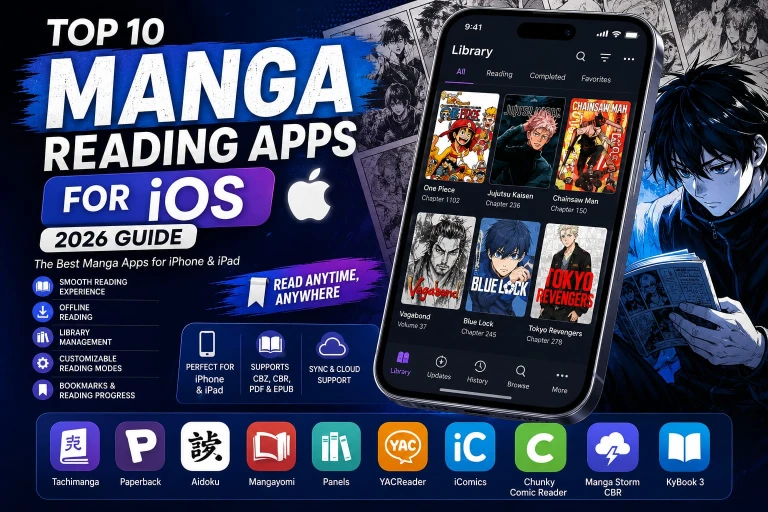
Top 10 Best Manga Apps for iOS (2026 Guide)
Reading manga on an iPhone or iPad has never been more convenient, but finding a reliable app is still challenging. Some apps focus on official publishers, while others let you organize your own manga collection, support offline reading, or offer advanced customization. Choosing the wrong app can mean a cluttered interface, limited features, or poor reading performance.
To make your decision easier, we carefully evaluated the most popular manga apps for iOS based on user experience, reading quality, offline support, customization, library management, performance, update consistency, and overall usability on both iPhone and iPad. Whether you’re a casual reader or someone who reads dozens of chapters every week, this guide will help you find the app that best fits your reading style.
Quick Answer: The best manga apps for iOS combine smooth page rendering, offline reading, customizable reading modes, library organization, bookmarking, and regular updates. The right choice depends on whether you prefer to read from supported services or manage your own manga library.
Why Trust Our Recommendations?
Instead of ranking apps based on popularity alone, we compared them using the features that matter most to everyday readers:
- Reading performance on both iPhone and iPad
- Offline reading capabilities
- Library management and organization
- Reading customization options
- File format compatibility
- Ease of navigation
- Active development and reliability
- Overall reading experience
Our Picks for the Best Manga Apps for iOS
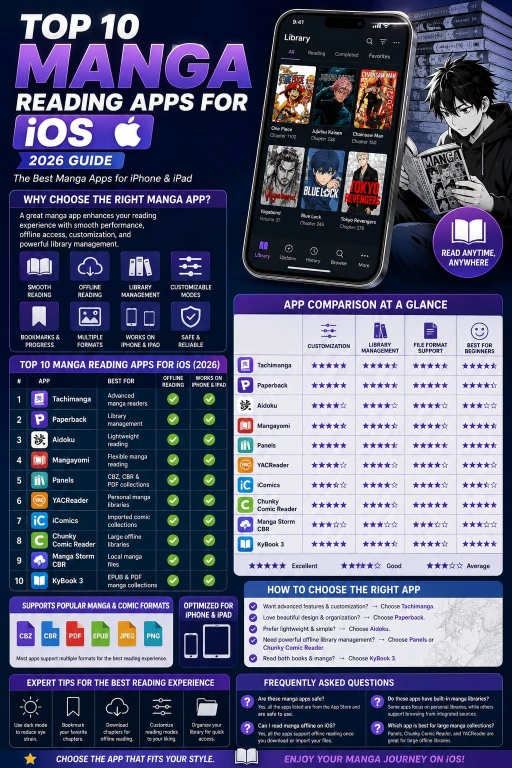
App | Best For | Offline Reading | Works on iPhone & iPad |
Tachimanga | Advanced manga readers | Yes | Yes |
Paperback | Library management | Yes | Yes |
Aidoku | Lightweight reading | Yes | Yes |
Mangayomi | Flexible manga reading | Yes | Yes |
Panels | CBZ, CBR & PDF collections | Yes | Yes |
YACReader | Personal manga libraries | Yes | Yes |
iComics | Imported comic collections | Yes | Yes |
Chunky Comic Reader | Large offline libraries | Limited | No |
Manga Storm CBR | Local manga files | Limited | No |
KyBook 3 | EPUB & PDF manga collections | Yes | Yes |
1. Tachimanga
If you frequently read manga on your iPhone or iPad, Tachimanga offers one of the most polished experiences available. Its clean interface, responsive performance, and flexible reading settings make it suitable for both beginners and experienced readers. You can customize reading direction, page transitions, gestures, brightness, and library organization without making the app feel overwhelming.
Another advantage is its smooth performance when handling larger libraries. Navigation feels fast, chapters load quickly, and switching between titles is seamless, making long reading sessions much more enjoyable.
Why You’ll Like It
- Clean and intuitive interface
- Offline reading support
- Custom reading directions
- Library organization tools
- Bookmark and reading progress tracking
- Optimized for both iPhone and iPad
Pros
- Excellent reading experience
- Fast and responsive
- Easy to organize large collections
- Regular improvements
Cons
- Advanced customization may take a little time to learn
Many readers switching from Android also compare Tachimanga with Tachiyomi for iOS before choosing an alternative.
2. Paperback
Paperback has earned a loyal following among iOS users thanks to its polished design and focus on organization. The app makes it easy to manage large collections, track your reading progress, and quickly continue where you left off. Its interface feels right at home on iOS, offering smooth animations and an uncluttered reading environment.
Readers who enjoy maintaining organized libraries will appreciate features such as collections, favorites, bookmarks, and customizable display options. Even with extensive libraries, browsing remains quick and responsive.
Key Features
- Clean iOS-inspired interface
- Reading history
- Favorites and collections
- Offline reading
- Reading progress synchronization
- Adjustable reading preferences
Pros
- Beautiful user interface
- Excellent library management
- Smooth navigation
- Beginner-friendly
Cons
- Some setup options may be unfamiliar to first-time users
3. Aidoku
Aidoku focuses on delivering a fast and distraction-free reading experience. Instead of overwhelming users with unnecessary options, it emphasizes performance, simplicity, and efficient navigation. The result is an app that launches quickly, feels responsive, and works well even during extended reading sessions.
Its minimalist design also helps readers stay focused on the content rather than complicated menus. Despite its simplicity, Aidoku still includes useful features such as offline reading, bookmarks, customizable reading modes, and library management.
Key Features
- Lightweight performance
- Offline reading
- Custom reading preferences
- Library organization
- Bookmark support
- Responsive navigation
Pros
- Fast loading speed
- Simple interface
- Smooth reading experience
- Easy to use
Cons
- Offers fewer visual customization options than some competitors
4. Mangayomi (iOS)
Mangayomi continues to attract iOS users by combining a clean interface with practical features that improve everyday reading. Library management, bookmarks, reading history, and customizable viewing modes help readers stay organized without making the app difficult to use.
Performance remains one of its strongest points. Pages render smoothly, navigation feels responsive, and switching between chapters is quick, making it well suited for binge reading.
Key Features
- Library organization
- Offline reading support
- Reading history
- Multiple reading modes
- Bookmark management
- User-friendly interface
Pros
- Smooth performance
- Modern design
- Easy navigation
- Suitable for new and experienced readers
Cons
- Feature availability may vary as the app continues to evolve.
5. Panels
If you already own digital manga volumes or maintain your own library, Panels is one of the most polished reading apps available for iPhone and iPad. Rather than focusing on a built-in catalog, it excels at organizing personal collections with a modern interface and smooth page rendering.
The app supports cloud storage integration, allowing you to access your library from services like iCloud Drive and other supported locations. Reading remains fluid even with large files, while customizable reading modes help reduce eye strain during long sessions.
Key Features
- Supports CBZ, CBR, PDF, and EPUB files
- Cloud storage integration
- Offline reading
- Library organization
- Reading statistics
- Optimized for iPhone and iPad
Pros
- Beautiful interface
- Excellent file compatibility
- Fast page loading
- Great for personal collections
Cons
- Some advanced features require the premium version.
6. YACReader
YACReader is a solid choice for readers who prefer managing their own manga collection instead of relying on online catalogs. It provides an organized reading environment with support for common comic and manga file formats while keeping navigation simple and responsive.
Its bookshelf layout makes it easy to browse large collections, and offline support ensures uninterrupted reading whether you’re traveling or away from an internet connection.
Key Features
- CBZ and CBR support
- Offline library access
- Bookshelf organization
- Bookmark support
- Reading progress tracking
Pros
- Easy library management
- Clean interface
- Smooth navigation
- Reliable offline performance
Cons
- Best suited for readers with local manga collections.
7. iComics
iComics focuses on simplicity while providing everything needed for an enjoyable reading experience. Importing files is straightforward, and once your library is organized, browsing and reading become effortless.
The app supports multiple viewing modes, remembers your reading progress automatically, and works exceptionally well on larger iPad displays.
Key Features
- Supports popular comic formats
- Offline reading
- Reading progress synchronization
- Gesture controls
- Simple library organization
Pros
- Beginner-friendly
- Responsive interface
- Fast imports
- Excellent reading controls
Cons
- Designed primarily for personal libraries rather than built-in content.
8. Chunky Comic Reader
Chunky Comic Reader has remained popular because of its speed and excellent handling of large libraries. Even collections containing hundreds of volumes remain easy to browse thanks to responsive navigation and efficient indexing.
Its intelligent page rendering makes reading feel smooth on both smaller iPhones and larger iPads, while automatic library organization reduces the time spent managing files.
Key Features
- Offline reading
- Large library support
- Fast indexing
- Reading customization
- Bookmark management
Pros
- Handles large collections effortlessly
- Smooth page transitions
- Stable performance
- Easy organization
Cons
- Focused on imported collections instead of integrated catalogs.
9. Manga Storm CBR
Manga Storm CBR is designed for readers who already have manga stored locally. It supports common archive formats and offers a lightweight reading interface without unnecessary distractions.
Navigation is simple, chapters load quickly, and customizable reading settings help create a comfortable reading experience for extended sessions.
Key Features
- CBR and CBZ support
- Offline reading
- Adjustable reading modes
- Bookmark support
- Lightweight interface
Pros
- Fast performance
- Easy to use
- Reliable offline reading
- Minimal learning curve
Cons
- Limited features compared to some premium alternatives.
10. KyBook 3
KyBook 3 is primarily an ebook reader, but its excellent support for EPUB, PDF, and document management makes it a practical option for users who maintain mixed digital libraries. If your collection includes manga, novels, and reference books, KyBook keeps everything organized in one place.
Its customizable themes, reading preferences, and cloud synchronization make it a versatile choice for readers who want more than a dedicated manga app.
Key Features
- EPUB and PDF support
- Cloud synchronization
- Offline reading
- Reading customization
- Library organization
Pros
- Supports multiple document formats
- Highly customizable
- Excellent organization
- Smooth performance
Cons
- Not designed exclusively for manga readers.
Which Manga App Is Right for You?
Every reader has different priorities, so the best choice depends on how you enjoy reading manga on your iPhone or iPad.
- Choose Tachimanga if you want a feature-rich manga reading experience with extensive customization.
- Choose Paperback if organizing a large library is your top priority.
- Choose Aidoku if you prefer a lightweight and distraction-free interface.
- Choose Mangayomi for flexibility and a modern reading experience.
- Choose Panels if you already own DRM-free manga or comic files.
- Choose YACReader if you manage a large personal manga collection.
- Choose iComics if you frequently import manga from your own storage.
- Choose Chunky Comic Reader if your library contains hundreds of downloaded volumes.
- Choose Manga Storm CBR if you mainly read local CBR or CBZ files.
- Choose KyBook 3 if you want one app for manga, ebooks, and PDFs.
No single app is perfect for everyone, but selecting one that matches your reading habits will provide a much better experience than simply downloading the most popular option. If you also read manga on Android devices, don’t miss our comparison of the Best Manga Reading Apps for Android.
Frequently Asked Questions
What are the best manga reading apps for iOS?
Tachimanga, Paperback, and Aidoku are among the most popular choices for iPhone users thanks to their smooth performance, customizable reading options, and excellent library management.
Can I read manga offline on iOS?
Yes. Most modern manga readers support offline reading, allowing you to download or import your library and continue reading without an internet connection.
Which manga reader works best on iPad?
Panels, Tachimanga, Paperback, and Chunky Comic Reader are excellent options for the iPad because they make full use of the larger display and provide comfortable reading layouts.
Are manga reading apps for iOS free?
Many apps offer a free version with core features, while some include optional premium upgrades for advanced customization, cloud features, or enhanced library management.
Do these apps support CBZ and CBR files?
Yes. Apps such as Panels, YACReader, Chunky Comic Reader, Manga Storm CBR, and iComics support popular comic archive formats, making them suitable for readers with personal manga collections.
Final Thoughts
The App Store offers plenty of best manga apps for iOS, but the best experience comes from choosing an app that matches how you actually read. Some readers prioritize customization, while others focus on offline access, personal libraries, or a clean interface.
If you’re looking for an all-around manga apps for iOS, Tachimanga and Paperback stand out for their balance of usability, performance, and reading features. Readers who manage their own collections may prefer Panels or Chunky Comic Reader, while those who value speed and simplicity will appreciate Aidoku.
Whichever app you choose, a well-designed manga reader can make reading on iPhone and iPad faster, more comfortable, and easier to manage for years to come.